
# My Homelab
Table of Contents
Why?
I have many different services I want to deploy and have full control over. Privacy is becoming more important in a world where we are having less of it day by day. Open-source, self-hostable software mitigate this problem, and they are awesome! Whether that would be a password manager or a VPN, there needs to be a computer to host these various applications. Luckily, I have a spare Raspberry Pi 5 (RPi 5) at home, a cheap Virtual Private Server (VPS) rented from Hetzner, and a domain from INWX. I will go through my homelab and how it’s set up.
Architecture
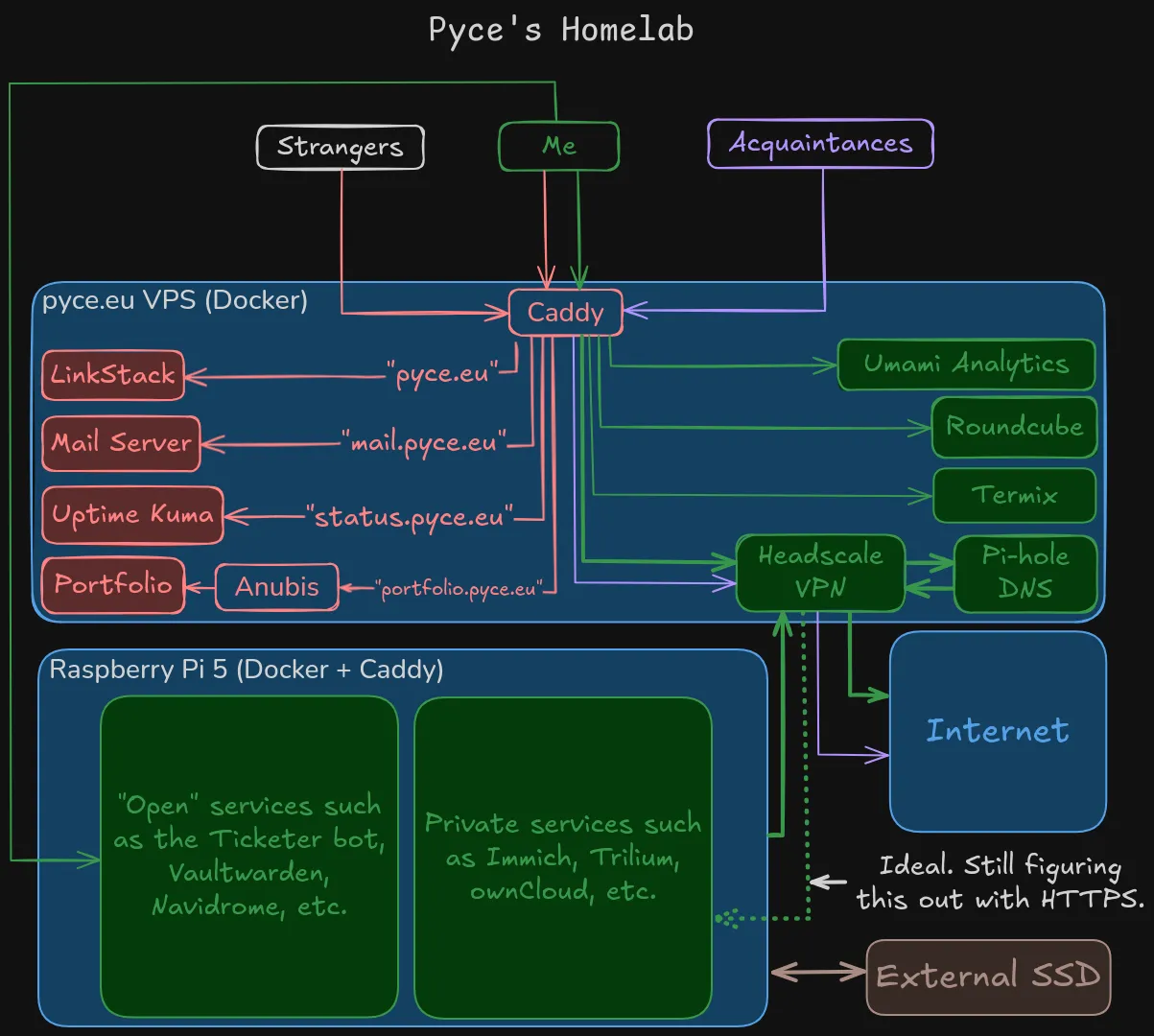
In principle, the homelab is very simple. Each service hosted on the VPS and RPi 5 is routed to via Caddy.
Each service is a Docker compose.yaml file which contains the configurations for each application,
including the frontend and all backend services such as databases.
To self-host a new application, it’s as simple as creating a compose.yaml file,
running docker compose up -d, and editing the Caddy configuration!
Reverse Proxying - Caddy
For reverse proxying to be possible, all of the services expose a Docker network which are accessible by Caddy through declaring external networks which are attached to the Caddy container. This enables Caddy to serve each route and subdomain to the correct service in a very simple way. Even receiving emails work with Caddy!
caddyfile
In this example, forgejo is a container which exposed its network to Caddy.
forgejo.pyce.eu { reverse_proxy forgejo:3000}You may have noticed that to access the portfolio (“portfolio.pyce.eu”), you’re routed first to Anubis, and then my portfolio page. Why? It’s because I do not want bots and AI scraping my portfolio, and therefore block those requests with the help of Anubis. This is possible by reverse proxying to the Anubis instance first, and when it has confirmed that the visitor is not a bot or scraper, it redirects to the portfolio!
The VPN - Headscale
I figured that since I own a VPS, I may as well install a VPN and self-host it. The best one in terms of Docker support and ease of access I found was Headscale, and it’s excellent! The setup is very simple and the VPN runs great, although it lacks a web UI. Luckily, Headplane saves the day!
compose.yaml
services:  headscale:    image: headscale/headscale:latest    container_name: headscale    restart: unless-stopped    expose:      - 8080      # - 9090    volumes:      - ./headscale-config:/etc/headscale      - headscale_data_lib:/var/lib/headscale      - headscale_data_run:/var/run/headscale    labels:      me.tale.headplane.target: headscale    command: serve    networks:      - headscale_network
  headplane:    image: ghcr.io/tale/headplane:latest    container_name: headplane    restart: unless-stopped    volumes:      - ./headplane-config/config.yaml:/etc/headplane/config.yaml      - ./headscale-config/config.yaml:/etc/headscale/config.yaml      - headplane_data:/var/lib/headplane      - /var/run/docker.sock:/var/run/docker.sock:ro    networks:      - headscale_network
volumes:  headscale_data_lib:  headscale_data_run:  headplane_data:
networks:  headscale_network:    # name: headscale_network
The code above is all that’s needed to self-host Headscale with a modern web UI! In terms of reverse proxy support with Caddy, the actual VPN is easy to support, but the website requires more configuration to get it up and running behind a reverse proxy.
Accessing Services
A great benefit in terms of security of a VPN is that you can allow access to certains devices only through it. For example, I have two Pi-hole DNS servers set up: one on the VPS and the RPi 5 for blocking ads, which all devices use as their DNS, so I can analyse the traffic and reduce the quantity of wasteful outbound queries. To access the Pi-hole website, I created an ACL configuration which only allows me to view it through the VPS’ MagicDNS domain name on port 8443:
{ "hosts": { "host-rpi-5": "100.64.0.5/32", "host-vps": "100.64.0.8/32" }, "acls": [ /* Allow everyone in the Headscale network to access: - the internet on any exit node. - Pi-hole DNS connections. - their own devices on all ports. */ { "action": "accept", "src": ["autogroup:member"], "dst": ["autogroup:internet:*", "autogroup:self:*", "host-vps:53", "host-rpi-5:53"] }, // Different services accessible by Pyce (administrator). { "action": "accept", "src": ["Pyce@"], "dst": ["host-vps:8443"] } ]}In addition, this level of control is also very useful to determine who can SSH to what device. I created a similar type of configuration for SSH, so only I can SSH to my own devices on the Virtual Private Network.
Personally, I access e.g. my Immich instance via a custom DNS record like https://immich.vpn to avoid having to use the MagicDNS domain and port of the device (e.g. https://rpi-5.home.vp:2283 🤮). Sure, you get certificate issues on browsers and phones, but it only takes two clicks to ignore the warning, plus you can install the local Caddy certificate to avoid this annoyance; this approach works well on iOS!
What to Host Where?
You may wonder: how do you decide what service to host on the VPS or Raspberry Pi 5 in your homelab? It’s rather simple, the services which may require critical and important storage or are planned for personal usage, are hosted at home. Applications which need lots of uptime and may be used by other people are thus hosted on the VPS. That’s why services like Ticketer reside at home: the data is important and used by many individuals; the same goes for Vaultwarden. Other services like Headscale and the mail server need the consistent uptime, which is guaranteed by the VPS. Just look at status.pyce.eu for the proof of consistent uptime!
Monthly Costs
What does this setup cost? I will only discuss the monthly payments required and will therefore disregard the Raspberry Pi 5’s price.
| Service | Price |
|---|---|
| INWX (.eu domain) | €10.63/year ≈ €0.89/month |
| Hetzner (CAX11 VPS) | |
| Total |
Not bad at all! Let’s compare it to common subscriptions in life:
| Subscription | Price |
|---|---|
| Gym | €35/month = €420/year |
| Netflix (Basic) | €9.49/month ≈ €113.88/year |
| Spotify | €11.80/month = €141.6/year |
| YouTube Premium | €12.99/month = €155.88/year |
| Mullvad VPN | €5/month = €60/year |
Considering you can utilise the VPS to do whatever you’d like, such as stream media or use it as a VPN, I’d say the price of a VPS (+ domain) is well worth it! Even if you don’t want to purchase a domain, you can utilise Dynamic DNS providers to effectively get a free (yet ugly) domain to use. Even better, if you only plan to host a few services, a simple mini-PC will last you a long time!
Conclusion
With the exquisite assistance of Docker and Caddy, it’s possible to set up many services, such as a VPN and website, for you and others to use. The VPN allow private access to applications. The addition of a domain enables setting up a mail server which you can use for regular email communication. Finally, it’s cheap1 to rent a VPS and a domain, or use your own spare computer at home to accomplish what I and many others have done!
Footnotes
-
I consider it cheap, but others may not have the same privilege to call it inexpensive. ↩